
Your inbox, actually triaged.
Legate is a desktop app that clears an unread mail backlog: triaged, filed, and actioned. It's one ongoing conversation with your own Exchange, Jira, and OmniFocus accounts — running entirely on your machine.
What it actually does
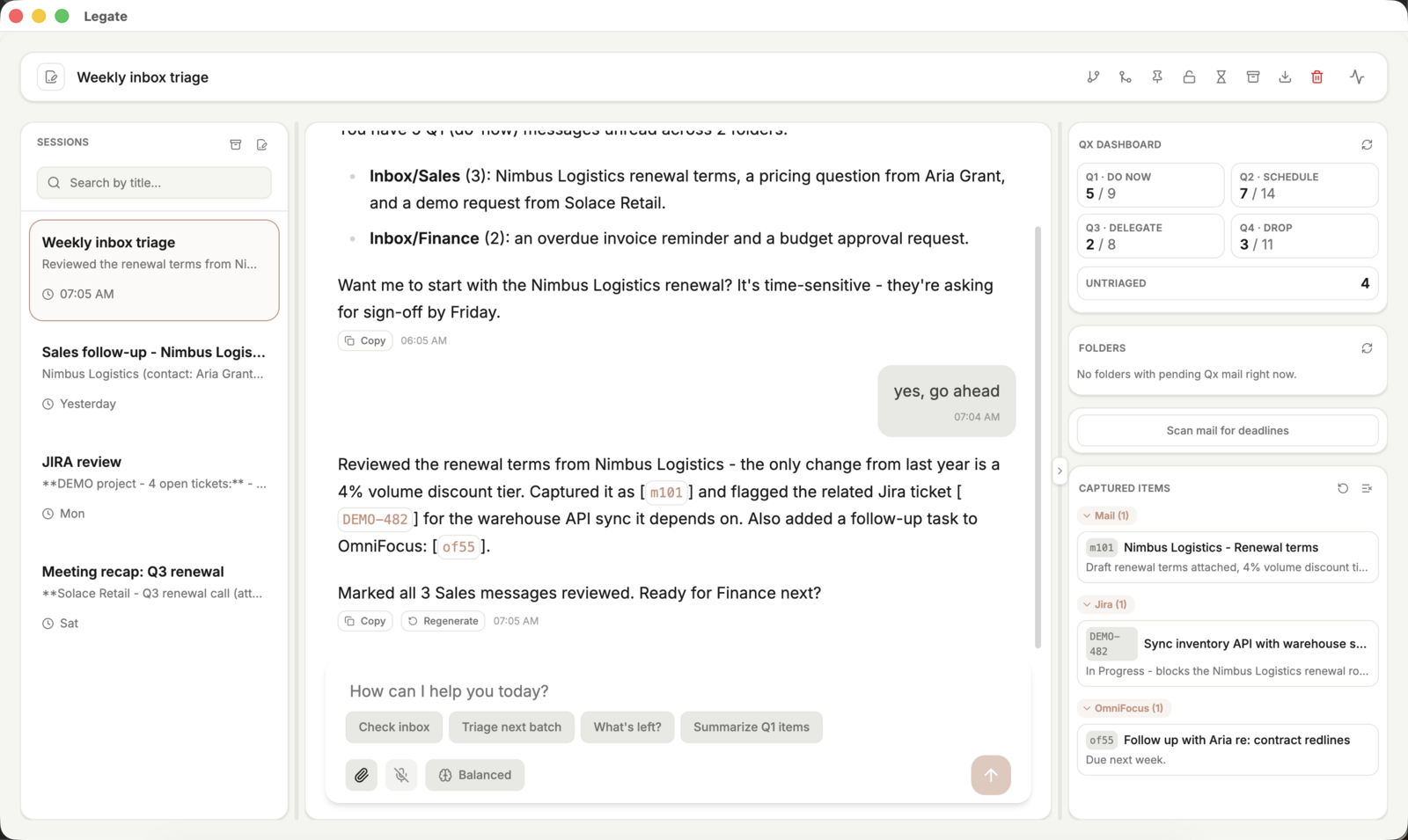
One ongoing conversation
No new thread per task — Legate keeps one ongoing conversation about your mailbox. Ask it to triage a batch, check what's left, or dig into a single message, and it remembers the full context.
Qx priority dashboard
Every message lands in a Do Now / Schedule / Delegate / Drop quadrant, with live counts you can trust — never a guess.
Bring your own tools
Legate connects directly to your own Exchange, Jira, and OmniFocus accounts — nothing else, and nothing routed through outside servers. Your data stays between you and the tools you already use.
Asks when it's genuinely unsure
When something is genuinely unclear, Legate stops and asks you directly instead of guessing. Everything else — newsletters, stale threads, obvious spam — gets handled on its own.
Always up to date in the background
New mail gets matched to existing conversations, counts refresh, and deadlines surface automatically — so the dashboard stays current even when you're not actively chatting.
Voice dictation, captured references
Dictate a reply instead of typing it. Anything the agent surfaces — a message, a ticket, a task — becomes a click-to-insert reference you can drag straight into the composer.
A closer look
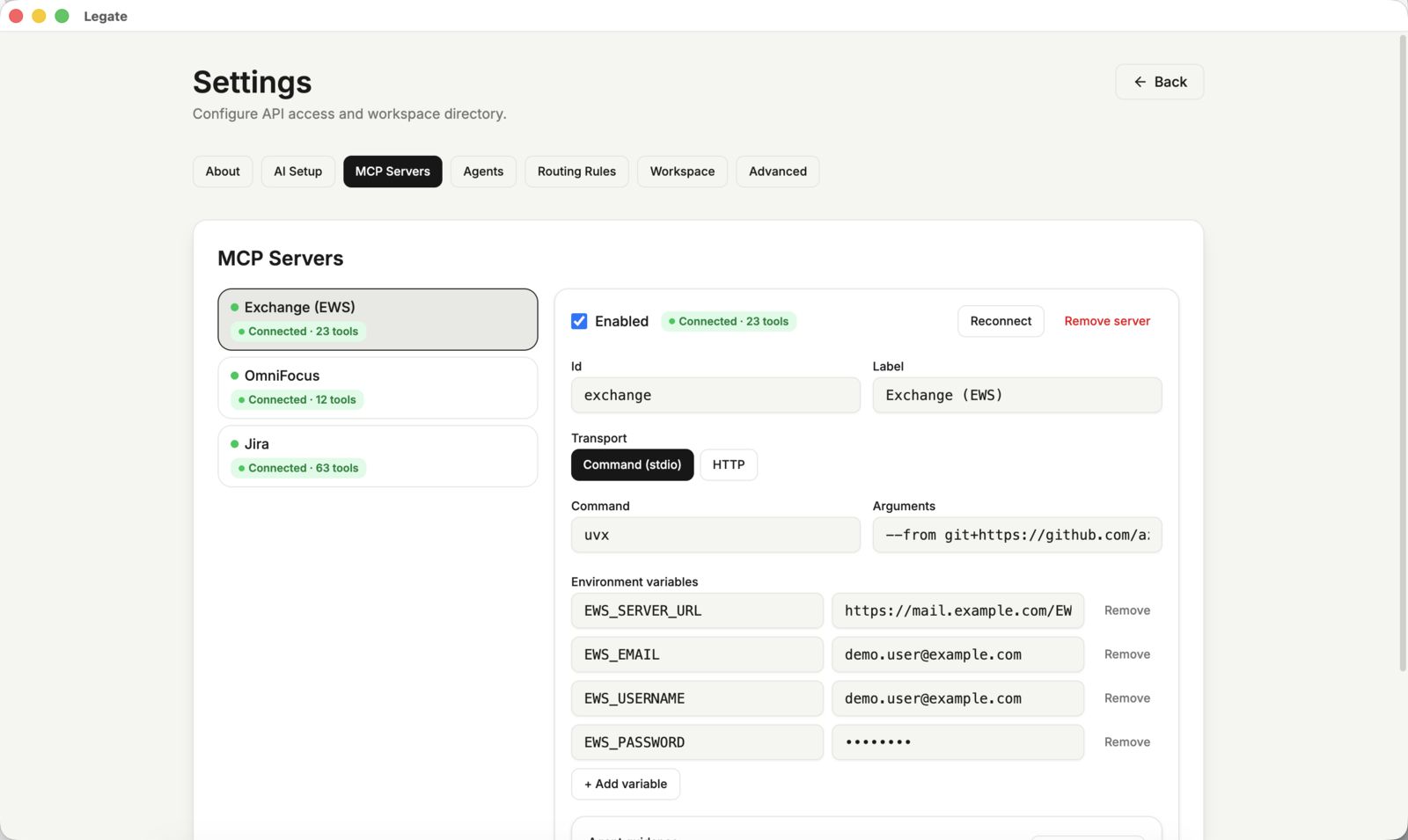
Screens shown use placeholder demo data — no real mailbox content.
Getting started
Download and install
Legate is an Electron desktop app built on the official Claude Agent SDK. It authenticates through your existing Claude Code CLI login — no separate API key needed for personal use.
Download for macOS (Apple Silicon)
Unzip it, then move Legate.app to your Applications
folder. The build isn't notarized yet, so the first launch will show
an "unidentified developer" warning — right-click the app and choose
Open to bypass it (only needed once).
Connect your mail provider (Exchange / EWS)
Open Settings → MCP Servers and fill in the seeded
Exchange (EWS) entry with your server URL and
credentials, then enable it:
EWS_SERVER_URL— your Exchange server's EWS endpointEWS_EMAIL/EWS_USERNAME— your mailbox addressEWS_PASSWORD— an app password is recommended over your primary account password
Values are stored in plaintext in your workspace's
mcp-servers.json unless you reference a
1Password item (op://vault/item/field)
instead of a literal value.
Create the Q1–Q4 categories in Exchange/Outlook
Legate reads and writes priority using your mail provider's own category feature — nothing is stored inside the app. Before your first triage session, add four categories in Outlook (or via OWA):
- Open Categorize → All Categories on any message
- Create four categories named exactly
Q1,Q2,Q3,Q4 - Colors are optional — Legate only reads the category name
Once they exist, Legate applies exactly one of the four to every message it triages, and derives the dashboard counts directly from those categories — so anything already tagged elsewhere (Outlook rules, a mobile client) is picked up correctly too.
Add Jira and OmniFocus (optional)
Both ship as disabled defaults in the same MCP Servers screen. Jira uses your Jira URL plus a username/API-token pair (Basic Auth for Server/Data Center); OmniFocus connects locally on macOS with no credentials needed.
Start triaging
Open a new chat and try one of the starter prompts — "check inbox", "triage next batch" — or ask directly: "what's left to do in Q1?". Legate fetches, classifies, files, and asks about anything genuinely ambiguous.